Resolve merge conflicts in the app
When a merge, rebase, cherry-pick, or revert stops, pick hunks in GitLane — or hand a text conflict to your agent as a proposal you still apply.
When a merge, rebase, cherry-pick, or revert stops on conflicts, GitLane switches into a conflict workspace. You don’t have to finish it in a terminal.
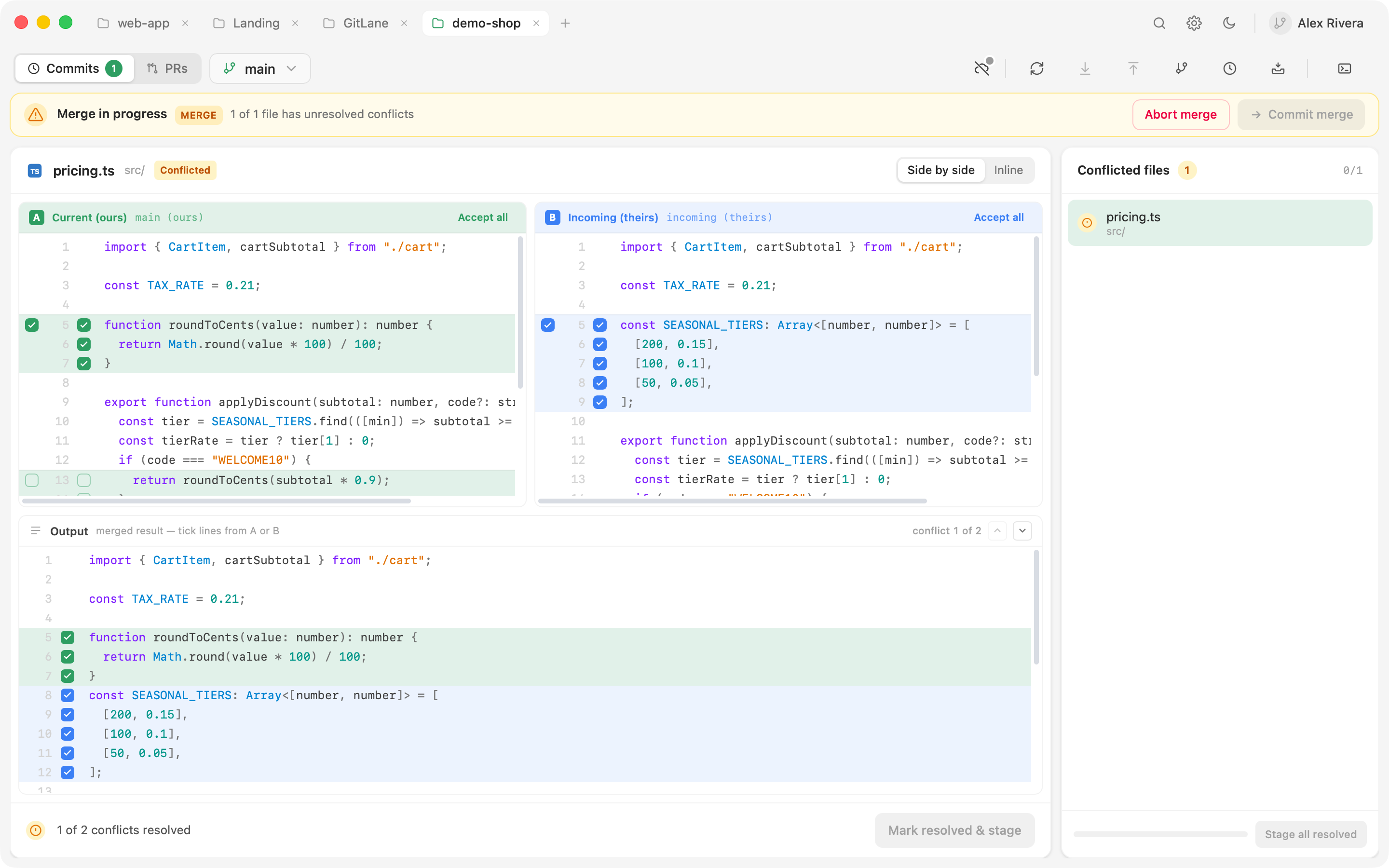
Resolve by hand
- Pick a file. Conflicted files are listed with what kind of conflict each one is.
- Work hunk-by-hunk in an inline or side-by-side editor, picking per line where you need to. For a file you don’t need to be surgical about, take ours or theirs wholesale.
- Continue the operation — or skip this commit, or abort and return to where you started.
Binary and modify/delete conflicts are handled explicitly rather than dumped as raw markers. If you fixed a file in your own editor, stage it as-is. A staged resolution can be un-staged so you can redo it.
Resolve with AI
When an agent is configured in Settings → AI Agents, Resolve with AI appears for a text conflict. Optionally add a note (“keep our logging”), then review the proposal in Output. GitLane writes the file, not the agent — Apply & stage (or Mark resolved & stage) is the same path as a manual resolve. Resolve all queues several files, three at a time.
That flow in more detail: Ask an agent to resolve a text conflict.
Good to know
The conflict machinery is git’s own, because writes shell out to your
gitbinary. A conflict GitLane shows you is exactly the conflict a terminal would show you, and abort here aborts the same way.
An agent answer that still contains conflict markers is refused. If the file changed on disk while the agent ran, that proposal is refused too.
Full walkthrough: Merge conflicts.
Installers: Download GitLane.