Drag branches to merge, rebase, or reset
Drop one branch onto another and GitLane offers only the operations that make sense — plus AI actions and the rest of the graph menu.
Grab a branch pill — in the commit graph or in the branch navigator — and drop it onto another branch. GitLane probes fast-forward in both directions and offers only the operations that actually apply.
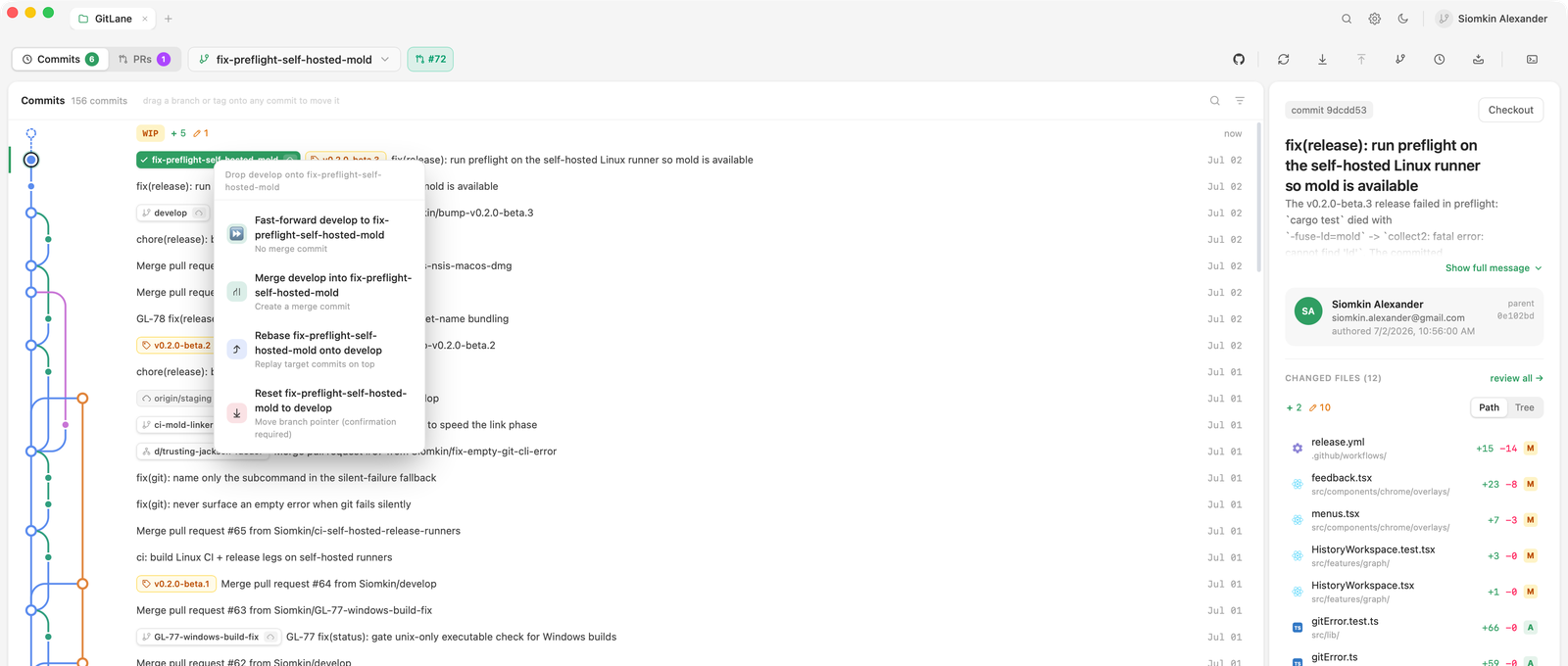
What the drop menu offers
| Offered | When it makes sense |
|---|---|
| Fast-forward | The target can advance to the source with no new commit |
| Merge | The branches have diverged and you want a merge commit |
| Rebase | You want the source’s commits replayed onto the target |
| Reset | You want the branch pointer moved, discarding what’s ahead |
The menu is derived from the relationship, not a fixed list. The chosen operation runs through your real git binary, so hooks, .gitconfig, signing, and conflicts all apply. If it stops on conflicts, GitLane opens the conflict workspace.
Right-click the graph
- AI actions (
⌘⇧A) — describe a commit, a range, or the uncommitted WIP row. See AI actions. - Cherry-pick / Revert
- Squash a multi-commit selection — including a range that sits under HEAD. See Squash a range below HEAD.
- Create a branch, tag, or worktree at any commit
- Compare any two refs
- Export a commit as a patch
On the current branch, Pull is ⌘⇧L and Push is ⌘⇧P. Pull is fast-forward only; when branches have diverged you’re asked what to do. Force-push always uses --force-with-lease and previews the remote commits it would replace.
Good to know
Writes are never auto-approved for AI actions. A shell call has to be a read-only
gitcommand, and network fetches are refused. A missing adapter or a signed-out CLI says so instead of timing out.
Reset, branch delete, discard, and force-push each preview the exact commits or files that would fall away before you confirm.
Full walkthrough: Branch operations.
Installers: Download GitLane.