Force push after a rewrite
Amend, rebase, or squash a pushed branch and Force push appears beside the disabled Push — always with a lease, after a preview of what changes on the remote.
Amend, rebase, or squash a branch you've already pushed and it diverges from its upstream. A plain push would be rejected, so Push is disabled — and GitLane now puts Force push on the action bar right beside it, instead of leaving you to find it.
Force push the checked-out branch
- After the rewrite, look at the action bar: Force push sits next to the disabled Push. Hover it to see how far ahead and behind the upstream you are.
- Click Force push. GitLane previews the push first: the local commits it will publish, and any commits on the remote that may be replaced.
- Read both lists, then confirm Force push.
The same action is in the branch menu: right-click the checked-out branch and choose Force push (with lease)…. That entry is there even when the branch hasn't diverged.
Rebase a remote feature onto your branch
The usual way to get here is rebasing someone's feature onto a newer base. You can do that by dragging the remote branch.
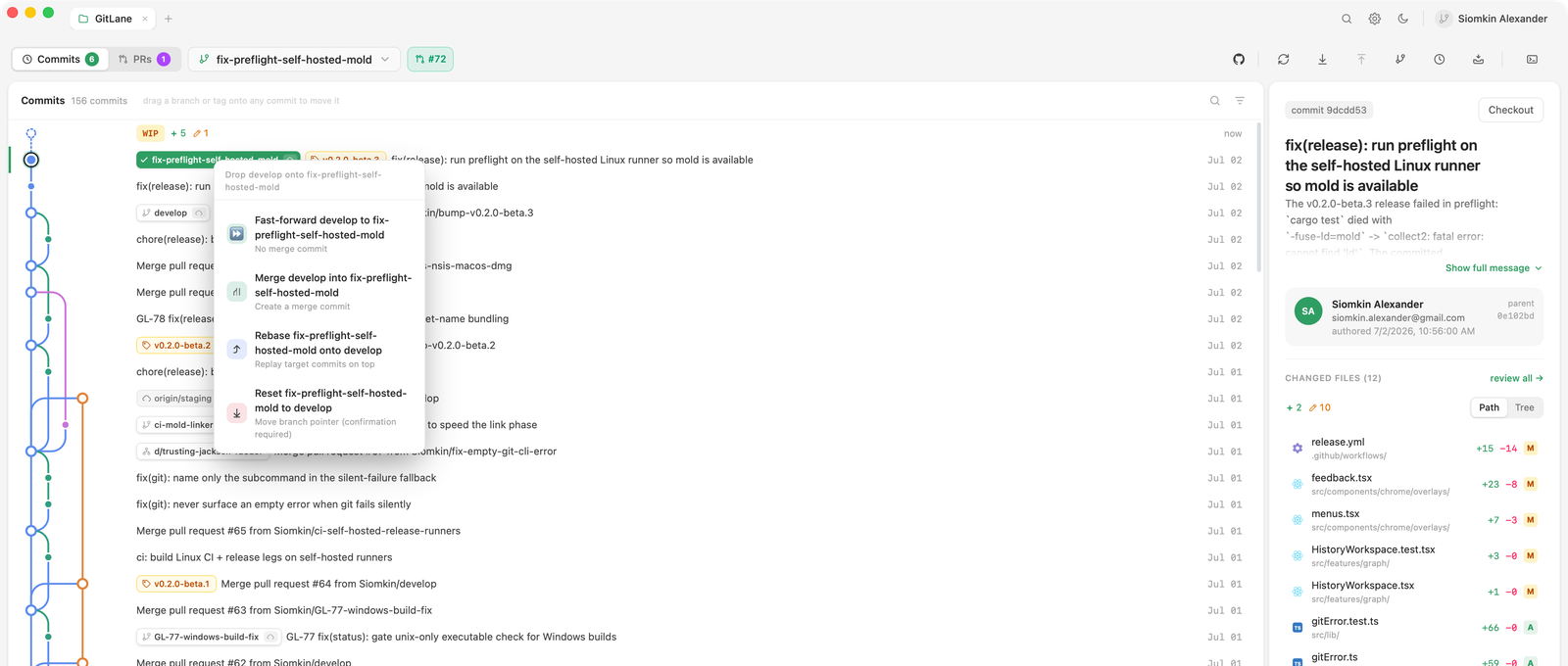
- In the graph or the branch navigator, drag
origin/featureonto your localmain. - Choose Rebase feature onto main.
- Confirm. If
featureisn't checked out, the button reads Check out feature and rebase.
GitLane checks out your local feature — creating it to track origin/feature if you don't have one, or fast-forwarding it to the remote tip — and then replays it onto main. main and origin/feature don't move. Then force push feature as above.
Before v2.3.1 this drop moved the local base onto the remote instead.
Good to know
Force push always uses
--force-with-leaseagainst the remote commit GitLane showed you in the preview. If anyone pushed to that branch since, the push is refused instead of overwriting their work.
The toolbar button only appears for the checked-out branch, and only when it has diverged from its upstream. A detached HEAD never gets it.
The rebase drop is refused if your local feature has genuinely diverged from origin/feature, or while a merge, rebase, or cherry-pick is in progress. If the branch is checked out in another worktree, the menu item is disabled and says which one.
If something still goes wrong, the reflog has the old tip: see Safety and recovery.
Shipped in GitLane v2.3.1.
Installers: Download GitLane.